
 Case study / Own product
StorageKit, browser storage without DevTools
A free Chrome extension I designed and built to inspect, edit, and snapshot localStorage, sessionStorage, and cookies in a panel that docks beside the page.
- Client
- Own product
- Year
- Service
- Product Design, Development, Website
- Website
- storagekit.dev
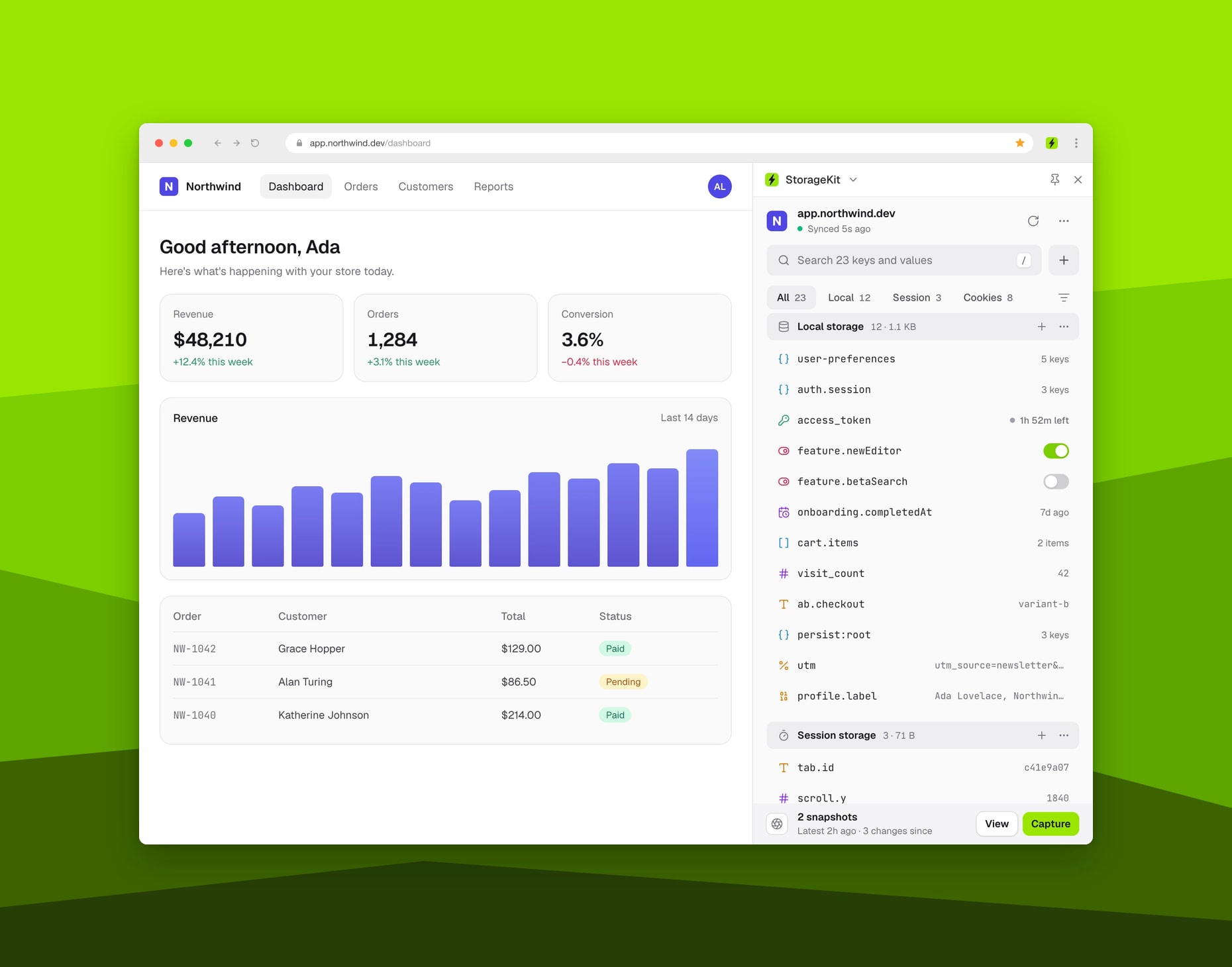
The storage panel your browser never shipped
Background
Every web app keeps part of its state in the browser: auth tokens, feature flags, A/B test buckets, saved preferences, cart items. When something breaks, that is often the first place a developer looks. Chrome's Application panel can read all of it, but it lives inside DevTools, splits localStorage, sessionStorage, and cookies into separate trees, and shows nested JSON as raw text.
I got tired of digging through it, so I built the panel I wanted. StorageKit is a free Chrome extension that puts all three storages in one list, right beside the page.
Objective
The goal was a storage tool that is faster to reach and easier to read than DevTools:
- One searchable list for
localStorage,sessionStorage, and cookies, with an item count and size for each. - Values that explain themselves: JWTs, JSON, timestamps, Base64, and URL-encoded values, detected and decoded automatically.
- Snapshots that capture the whole storage state of a site, compare it with the live page, and restore it later.
- A panel that docks in Chrome's side panel and stays open across tab switches and reloads.
- 100% local: no network calls, no analytics, and no account.
Challenges
- Three storages, one list: cookies carry their own attributes (domain, path, SameSite, Secure, HttpOnly, and expiry), while
localStorageandsessionStorageare plain key and value pairs. They had to share one list, one search, and one editor without hiding those differences. - Restoring without surprises: restoring a snapshot can replace a signed-in session. So before anything changes, StorageKit shows which keys are only in the snapshot, only on the page, or have a different value, and it warns you when a snapshot was taken on another site.
- Pages the browser blocks: extensions can't read pages like
chrome://, and some tabs need a refresh before the extension can reach them. Instead of failing silently, the panel explains what happened and offers a Reload page button. - Earning trust: to read storage on any site, the extension needs access to every site. That is a big ask, so StorageKit makes no network requests at all. Fonts ship with the extension instead of loading from Google Fonts, and site icons come from the browser's local cache.
The Solution
StorageKit started as a compact popup with an inspector, inline editing, and snapshots you could export and import. Later releases added a nested JSON tree editor, JWT decoding, duplicate key warnings, and plain-language messages for storage quota errors.
Version 3 is a ground-up redesign. One focused panel replaced the old compact and dashboard layouts, and it opens from the toolbar or docks beside the page:
- Live storage and cookie editor: every row gets a type icon. Booleans toggle in place, nested JSON opens as an editable tree, and J and K step through keys.
- Automatic decoding: tokens show their claims, a progress bar from issue to expiry, and a live countdown. Timestamps show relative time, and Base64 and URL-encoded values show decoded.
- Snapshots: one click captures every value on the site. Compare a snapshot with the live page key by key, then restore it or export it as JSON for a teammate.
- Search inside values: press / and start typing. StorageKit matches inside values, not just key names.
- Copy as code: copy any value as a
setItem()call, adocument.cookieline, a cURL command, or anAuthorization: Bearerheader.
I also designed and built storagekit.dev, the product website with the feature tour, a comparison with the alternatives, the changelog, and answers to common questions.
Results and Impact
- 5.0 on the Chrome Web Store: all 10 reviews so far give it five stars. Developers mention easier debugging, a clean interface, and snapshots that save them time.
- Nothing leaves the machine: zero network calls, zero tracking, and no account to create.
- Free for everyone: no ads and no paid tier. Optional one-time sponsorships on GitHub support its development.
Really handy tool for day-to-day debugging. Saving and restoring snapshots is a huge time-saver.
Conclusion
StorageKit turned a small daily annoyance into a focused product: one panel for every key, cookie, and token, right beside the page. I handled all of it, from product design and the extension itself to the website that introduces it, and I keep improving it with every release.
What I did
- Product Design
- UX/UI Design
- Extension Development
- Website Design and Development
Technology Stack
- React
- TypeScript
- Tailwind CSS
- Vite
- Chrome Extensions API
- Next.js
- Vercel
- Chrome Web Store rating
- 5.0
- Network calls
- 0
- Storage types in one panel
- 3
- Forever free
- $0